Free tools

Free tools for temperature mapping and logger placement

Quickly get a first indication of measurement points, monitoring position, audit readiness or service level. The tools help you choose direction before starting a full project.

Estimate measurement points

Create an initial 3D measurement-point proposal

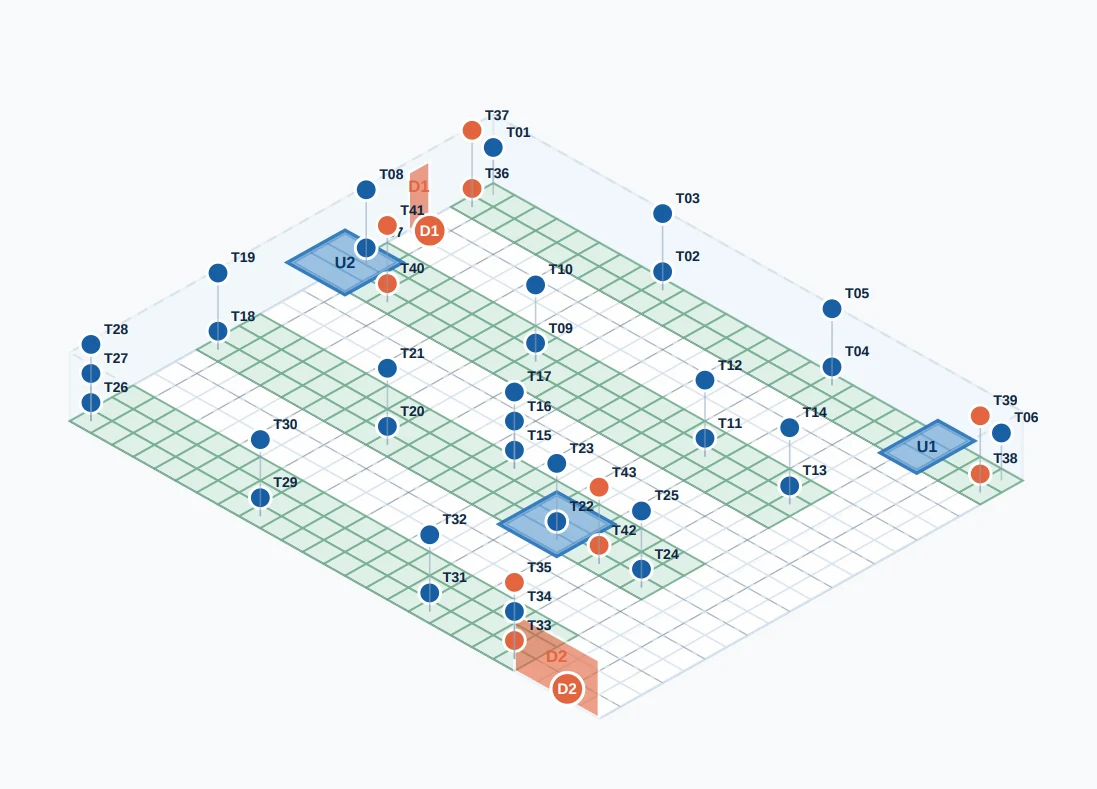
Use the 3D mapping tool to mark product zones, doors, climate units and risk locations visually. The tool creates a first proposal for logger placement and shows where additional attention may be needed. Placement is based on room size, a basic grid and known risk locations such as door zones, height differences and airflow. It aligns with practical principles from WHO and ISPE, but remains indicative.

3D mapping tool for measurement points and logger placement
From indication to dossier

When is a free tool enough?

A free tool is useful for a first direction. For example, to determine whether you probably need around 10, 15 or more loggers, or to see whether your fixed sensor is in a defensible position.

For formal temperature mapping, more is usually needed: a protocol with risk assessment, predefined acceptance criteria, a measurement-point grid, calibration certificates, raw measurement data, hot- and cold-spot analysis, conclusion and sensor advice.

Have my measurement plan checked
Practical explanation

Temperature mapping, monitoring and logger placement are connected

Temperature mapping shows how temperature is distributed through a space. This makes warm and cold locations visible. That information helps determine where products can be stored safely, where data loggers should be placed during a mapping and where a fixed monitoring sensor can logically be installed.

Monitoring should therefore ideally follow from mapping. A fixed sensor in a random location can give a misleading picture of actual product temperature. That is why we look not only at the number of loggers, but also at room layout, airflow, doors, racking, product zones and room use.

Read the knowledge article about monitoring and temperature mapping →

Mapping identifies hot and cold spots.

Monitoring should follow from mapping results.

Logger placement depends on risk, airflow and product locations.

FAQ

Frequently asked questions about temperature mapping tools

How many loggers do I need for temperature mapping?

That depends on volume, layout, product zones, door use, airflow, temperature class and quality risk. A small fridge needs a different approach than a warehouse with racking, multiple doors and climate units.

Where do you place data loggers during temperature mapping?

Loggers are placed at representative product locations and expected risk zones, such as doors, corners, racks, height differences, air supply, return air and likely hot or cold spots.

Does the 3D mapping tool replace a formal protocol?

No. The tool provides a first visual indication. An audit-ready dossier also requires a protocol, measurement-point rationale, acceptance criteria, calibration records, raw data, analysis and conclusion.

What is the difference between mapping and monitoring?

Mapping investigates how a space behaves. Monitoring then supervises storage conditions at fixed positions. The monitoring position should preferably be based on mapping results.

Can I measure myself with rented loggers?

Yes. You can measure yourself with rented calibrated data loggers. Depending on your situation, you can use only the logger data or have a full mapping and qualification dossier prepared.